> ## Documentation Index
> Fetch the complete documentation index at: https://docs.generalmagic.insure/llms.txt
> Use this file to discover all available pages before exploring further.
# Managing your documents
> How Edward organizes underwriting documents, how to add and verify them, and how to keep your library current.
Edward is only as good as the documents behind it. As an admin, you keep your brokerage's library accurate, correctly scoped, and up to date.
 ## Document types
Edward treats documents differently depending on how authoritative they are:
| Type | What it is | How Edward uses it |
| ----------------- | ---------------------------------------------------------------- | ---------------------------------------------------------------------------------------------------- |
| **Manuals** | Carrier underwriting manuals | The primary, authoritative source. Underwriting answers are built from these. |
| **Supplementary** | Bulletins, payment plans, policy wordings | Updates and additions that modify the manual. For example, a newer bulletin overrides an older rule. |
| **General** | Brokerage-specific documents with no carrier, product, or region | Background context. Can add to an answer but never overrides an underwriting rule. |
Edward ranks evidence: manuals earn trust, supplementary documents refine it, and general documents only add context. An answer will never let a general document override a carrier's underwriting rule.
## Where documents come from
Your workspace draws on two sources:
* **General Magic documents:** shared carrier documents we maintain, available to every brokerage and filtered to each broker's scopes.
* **Your brokerage's documents:** documents you upload, visible only within your brokerage and filtered to each broker's scopes.
## Adding a document
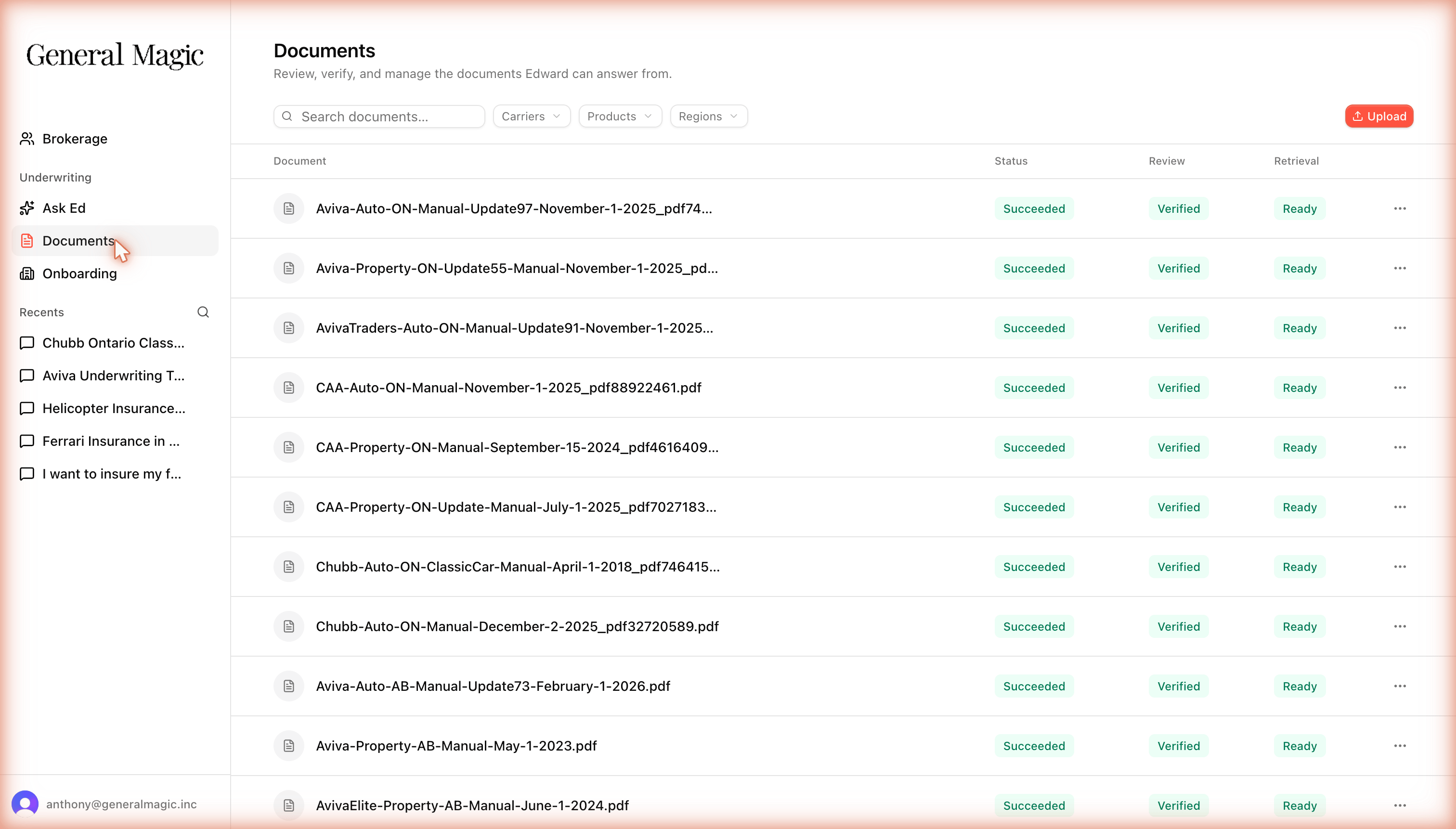
On the **Documents** screen, click **Upload** and choose the PDF.
Edward reads the document and proposes its carrier, product, region, and date. Review these, because accurate tagging is what routes the document to the right questions.
Set the document's **Review** to **Verified**. Once its **Retrieval** shows **Ready**, it's live and Edward can answer from it.
A document is live only when its **Review** is **Verified** and its **Retrieval** is **Ready**. If a broker says a document "isn't showing up" in answers, check those two columns on the **Documents** screen.
## Keeping your library current
Edward resolves conflicts by date: when two documents disagree, **the newer authority governs**. To keep answers accurate:
* Upload **bulletins and updates** as they arrive rather than editing old files. Edward layers the newer document on top of the base manual automatically.
* Replace outdated manuals when a carrier issues a new edition.
* Remove or re-scope documents that no longer apply.
Duplicate uploads are handled automatically: if you upload a file that's already in the system, Edward recognizes it and won't reprocess it.
## Document types
Edward treats documents differently depending on how authoritative they are:
| Type | What it is | How Edward uses it |
| ----------------- | ---------------------------------------------------------------- | ---------------------------------------------------------------------------------------------------- |
| **Manuals** | Carrier underwriting manuals | The primary, authoritative source. Underwriting answers are built from these. |
| **Supplementary** | Bulletins, payment plans, policy wordings | Updates and additions that modify the manual. For example, a newer bulletin overrides an older rule. |
| **General** | Brokerage-specific documents with no carrier, product, or region | Background context. Can add to an answer but never overrides an underwriting rule. |
Edward ranks evidence: manuals earn trust, supplementary documents refine it, and general documents only add context. An answer will never let a general document override a carrier's underwriting rule.
## Where documents come from
Your workspace draws on two sources:
* **General Magic documents:** shared carrier documents we maintain, available to every brokerage and filtered to each broker's scopes.
* **Your brokerage's documents:** documents you upload, visible only within your brokerage and filtered to each broker's scopes.
## Adding a document
On the **Documents** screen, click **Upload** and choose the PDF.
Edward reads the document and proposes its carrier, product, region, and date. Review these, because accurate tagging is what routes the document to the right questions.
Set the document's **Review** to **Verified**. Once its **Retrieval** shows **Ready**, it's live and Edward can answer from it.
A document is live only when its **Review** is **Verified** and its **Retrieval** is **Ready**. If a broker says a document "isn't showing up" in answers, check those two columns on the **Documents** screen.
## Keeping your library current
Edward resolves conflicts by date: when two documents disagree, **the newer authority governs**. To keep answers accurate:
* Upload **bulletins and updates** as they arrive rather than editing old files. Edward layers the newer document on top of the base manual automatically.
* Replace outdated manuals when a carrier issues a new edition.
* Remove or re-scope documents that no longer apply.
Duplicate uploads are handled automatically: if you upload a file that's already in the system, Edward recognizes it and won't reprocess it.