

Citations
Edward cites the source behind each answer. Click a citation to open the original document and see the rule in context, the same carrier manual or bulletin you’d cite yourself.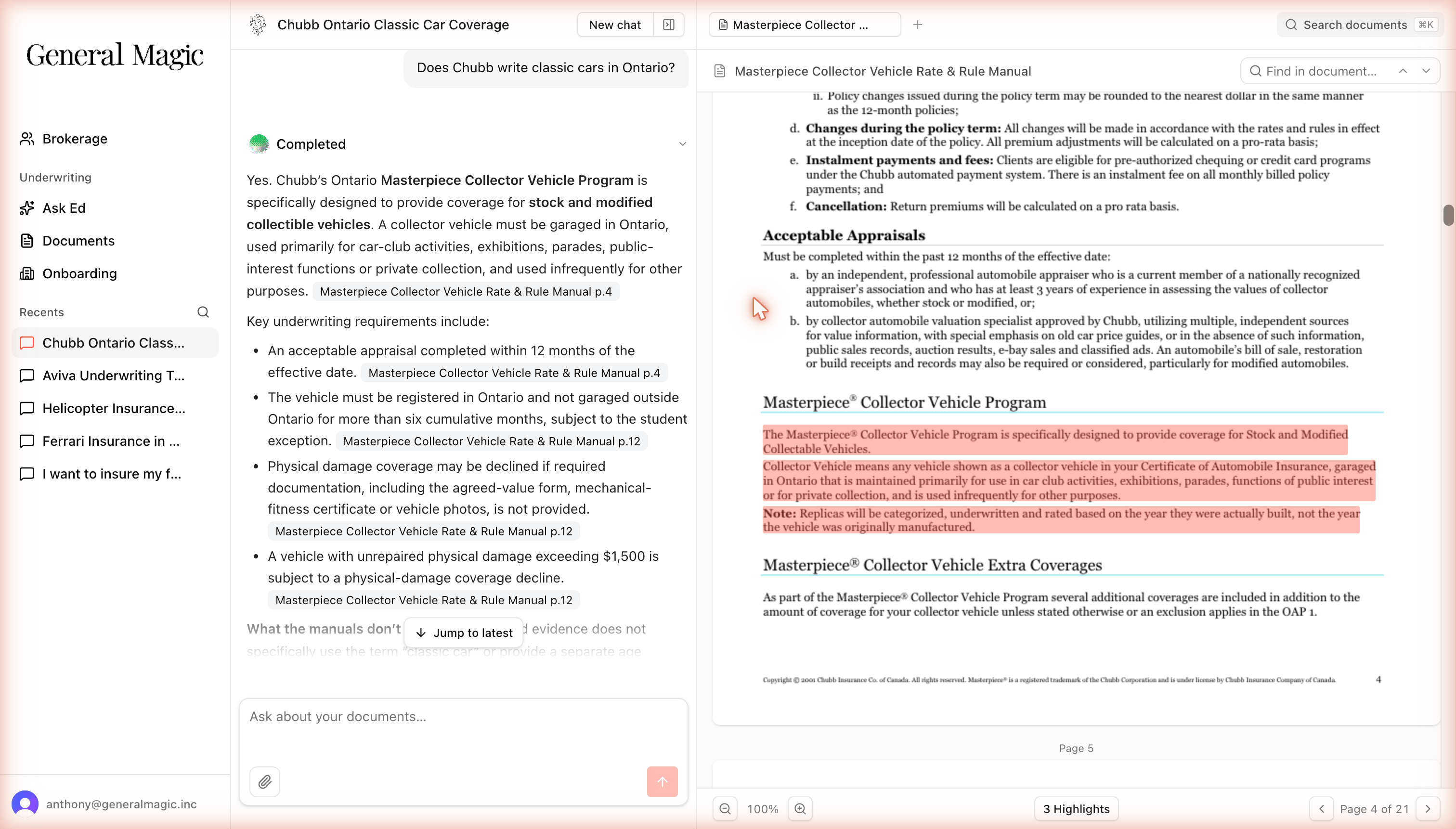
Click a citation chip and Edward opens the exact source page beside the answer, with the supporting passages highlighted.
When Edward is unsure
Edward is built to be honest about what it doesn’t know. Many answers include a “What the manuals don’t state” note that spells out the limits of the evidence. Watch for two cases in particular:- No document found: if nothing in your library covers the question, Edward tells you plainly instead of inventing an answer. If you think a document should exist, ask your admin whether it’s been uploaded and verified.
- General answer only: if Edward can only answer from general background rather than an authoritative carrier document, it flags that the answer isn’t grounded in a specific underwriting rule.
How Edward handles conflicting documents
When two documents disagree (say, a manual and a newer bulletin), Edward follows the rule that the newer authority governs. It uses the most recent applicable document and layers newer bulletins on top of the base manual, so you get the current rule rather than an outdated one.If you spot an answer that seems to cite an outdated rule, let your admin know; it may mean a newer bulletin or manual edition still needs to be uploaded.